Bluetooth controller connection and pairing
Bluetooth success has three stages: the controller enters pairing mode, Windows connects it, and DS4Windows recognises the resulting device.
On this page
Pair the correct controller
| Controller | Pairing action |
|---|---|
| DualShock 4 | Hold PS + Share while off until the light flashes |
| DualSense / Edge | Hold PS + Create while off until the lights flash |
| Switch Pro | Hold its sync button until pairing indicators cycle |
| Joy-Con | Hold the small sync button; pair each half separately |
Pair in Windows
- Charge the controller and disconnect its USB cable.
- Put the controller in pairing mode using the appropriate action above.
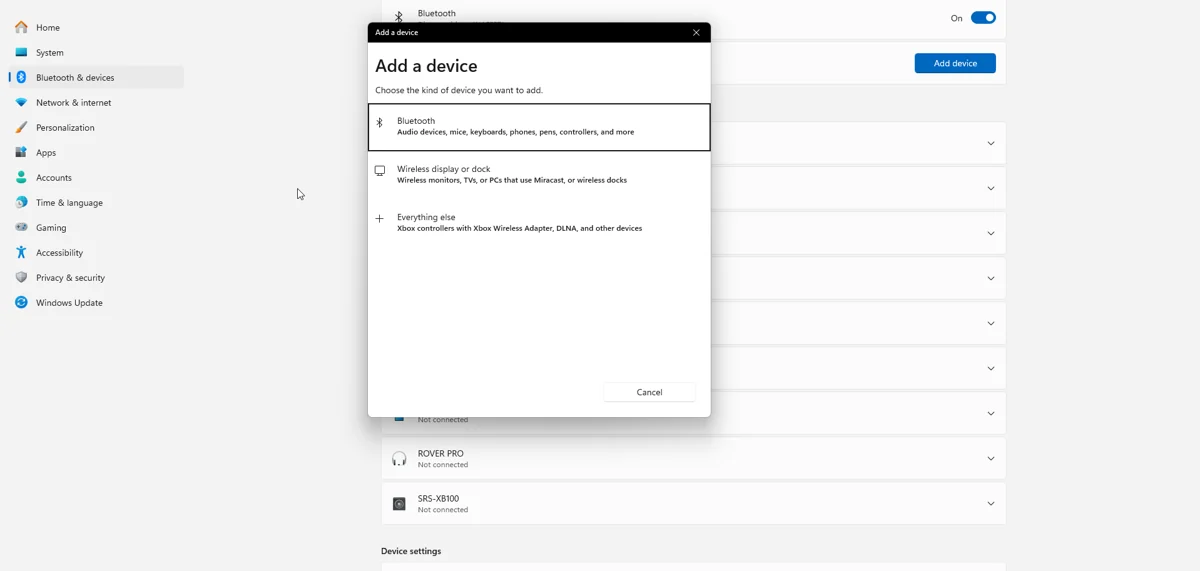
- Open Windows Settings > Bluetooth & devices > Add device > Bluetooth.
- Select the controller and wait for connection.
- Open DS4Windows and check live input before launching a game.
Improve a dropping connection
Test close to the PC with one controller. Keep the adapter away from dense USB cabling, hubs and other radio interference. A short USB extension can change adapter placement. Use manufacturer-supported Bluetooth drivers and change one variable at a time.
If pairing is stale
Remove only the affected controller’s saved Windows pairing, then pair it again. A console or another PC may have reclaimed the controller. Compare with a wired test to establish whether the fault is Bluetooth-specific.
Features differ from USB
The same device can expose different audio endpoints and timing over different transports. Classic DS4Windows does not turn generic Bluetooth into a Windows controller headset connection. Nexus has separate compatible-device speaker and haptics workflows; verify those independently.
Check HidHide after switching transport
USB and Bluetooth device instances can need separate rules. If the pad disappears only over Bluetooth, temporarily disable device hiding and reconnect to test the rule. Update the allowlisted executable path if you moved DS4Windows.
Related guides
Sources: Nexus release documentation · Project and screenshot credits. Updated 11 November 2026.